Tuesday, 17 March 2026

Funtion in Python

 #Input Function  waits for the user to type some text on the keyboard

myname=input("Enter your Name :")

print("Hello ,My Name is ", myname)

#len() length Function Find the Number Words given String out Put Should Be Integer

#Example len(Python)---> Python having 6 Charters

print("Length of Python Is ",len("python"))

# integer to String Convertion in Python

value ='I have eaten ' + str(99) + ' burritos.'

print(value)

#string to integer convertion in Python

value="99"

print(1+int(value))

#The == operator (equal to) asks whether two values are the same as each

#other.

#The = operator (assignment) puts the value on the right into the variable

#on the left.

Monday, 16 March 2026

ZERO to Hero Level Print Function Details in Python

# print Function in Python its   built-in    functions
#Print Function Display the result in Console/screen to user
#print function having multiple parameter
#---------Jut Print Hello world use Below Statement--
print("Hello World ")
#Printing Multiple Values
a=10
b=20
print(a+b)    # add two Numbers with sum
print(a , b ) # add Space to the values
# if u want Space in Each Value Using Seprator parameter In Print Function


print("Python", "Java", "C++", sep=" ** ")

#end Parameter Will Work Wat u need put end of statement

print("Python", "Java", "C++", sep=" ** ",end=" etc ....!")

#Flash value should true or false(It forces immediate output.) below \n means print result in new line

print("\n","Python", "Java", "C++", sep="%",end=" etc ....!",flush=False)
print("\n","Python", "Java", "C++", sep=" --",end=" etc ....!",flush=True)

#\t means new tab and \\ means Backslash \" menas Double quote

print("Hello\tworld", "hello\\world", "hello \" world")

#Syntax:print(*objects, sep=' ', end='\n', file=sys.stdout, flush=False)

#objects    values to print sep    separator end  line ending file   output location

#flush  force output

 END ZERO to Hero Level Print Function Details in Python


Saturday, 18 January 2025

Scinario Based interview Question .....

 How To Achieve The Scenario.

Input

File1.csv 

id,Name

1,Mahendra

File2.csv

City, State

Hyd,Telangana

File3.csv

Stateid

Ts

I want Out put

File.Csv

Id,Name,City,State,StateId

1,Mahendra,Hyd,telangana,Ts


Solution:-

[tFileInputDelimited (File1)] --> [tAddRowNumber] -->|

                                                      |

[tFileInputDelimited (File2)] --> [tAddRowNumber] -->|--> [tMap] --> [tFileOutputDelimited (File.csv)]

                                                      |

[tFileInputDelimited (File3)] --> [tAddRowNumber] -->|


SQL very Important Questions :-

 SQL very Important Questions :-

--->--Find the Dupilcates From Table

SELECT JOB,COUNT(JOB) FROM EMP

 GROUP BY JOB

HAVING COUNT(JOB)>1;

---> Delete Duplicate From table

DELETE FROM  EMP E WHERE ROWID<> (SELECT MIN(ROWID) FROM EMP Y 

WHERE E.EMPNO=E.EMPNO);

-->dISPALY nTH SALARIES

SELECT * FROM(SELECT DENSE_RANK() OVER(ORDER BY SAL DESC)AS RNK,E.*FROM EMP E)

WHERE RNK=1;

Select * from emp where Rownum <= 5;

select rownum, e.* from emp e where rownum<=(select count(*)/2 from emp);

--->

select distinct A.empno, A.ename,a.sal,b.sal, A.mgr, B.empno, B.ename

from EMP A, EMP B where A.mgr = B.empno and A.sal > B.sal ;


very Important Questions :-

 SCR:- my source file data Coming Correctly yesterday , today some bad records Length is Exceed in my file without job fail process good records.. how to implement logic in Talend.

Example Job Flow:

  1. tFileInputDelimited
    (Read your source file)

  2. tSchemaComplianceCheck

    • Define your schema constraints:
      • Field Length: Set the maximum length for each column.
      • Data Type: Validate data types (e.g., String, Integer).
      • Nullability: Define whether null values are allowed.
  3. Outputs from tSchemaComplianceCheck:

    • Valid Rows Output: Connect to your main processing components (e.g., database, transformation).
    • Rejected Rows Output: Save to a file using tFileOutputDelimited or log with tLogRow.

  Source File:-


City Having 3 Charter defined as per client requirement , But some one entry wrong data in source i want reject those records process remain records 

Job Desgin:-

Ouput


Thursday, 9 January 2025

 Real Time interview questions:-

1.Write condition in tMap expression builder(i.e.,if the branch is CSE then computer science, IT then Information Technology, Other than CSE or IT then it is Other ) .

2. if we have 10 excel files which are in AWSs3 location how will you load the table in database oracle/postgres? IN this flow if the file is not correct how will you recect it?

3. We have 1crore records in input ,output should contains 10 files . Each file should have 10lakhs records.

4. Find count of columns in a file using Talend?

5.I have 3 jobs if job failed it should run from the point of failure?

6. I have 5 sub jobs, I want to run first 3 sub jobs parallel and other 2 sub jobs parallel how would you do it?

7. How we get first 100 records from a CSV file, last 100 records from a CSV file and how we get if we have actual header?

8. How to perform full outer join in Talend?


Answer Will Post as per comments 

Tuesday, 18 June 2024

Trigger connections in talend use cases


Trigger connections define the processing sequence, so no data is handled through these connections.

The connection in use will create a dependency between Jobs or subJobs which therefore will be triggered one after the other according to the trigger nature.


Trigger connections fall into two categories:

  • subJob triggers: On Subjob Ok, On Subjob Error and Run if,
  • component triggers: On Component Ok, On Component Error and Run if.


OnSubjobOK: This connection is used to trigger the next subJob on the condition that the main subJob completed without error. This connection is to be used only from the start component of a subJob.

These connections are used to orchestrate the subJobs forming the Job or to easily troubleshoot and handle unexpected errors.

OnSubjobError: This connection is used to trigger the next subJob in case the first (main) subJob do not complete correctly. This "on error" subJob helps flagging the bottleneck or handle the error if possible.

OnComponentOK and OnComponentError are component triggers. They can be used with any source component on the subJob.

OnComponentOK will only trigger the target component once the execution of the source component is complete without error. Its main use could be to trigger a notification subJob for example.

OnComponentError will trigger the subJob or component as soon as an error is encountered in the primary Job.

The main difference between OnSubjobOK and OnComponentOK lies in the execution order of the linked subJob.

·        With OnSubjobOK, the linked subJob starts only when the previous subJob completely finishes.

·        With OnComponentOK, the linked subJob starts when the previous component finishes.

The execution order of the subJobs linked by OnComponentOK is within the execution cycle of the previous subJob.

Run if connection settings

About this task

In the Basic settings view of a Run if connection, you can set the condition to the subJob in Java.


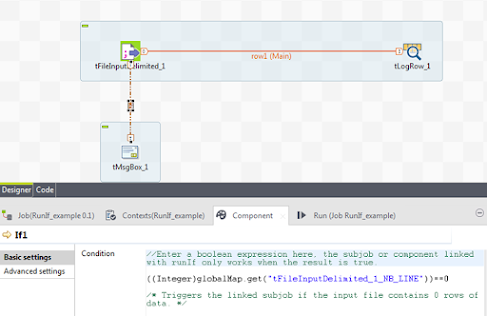
In the following example, a message is triggered if the input file contains 0 rows of data.


Procedure

1.     Create a Job and drop three components to the design workspace: a tFileInputDelimited, a tLogRow, and a tMsgBox.

2.     Connect the components as follows:

o   Right-click the tFileInputDelimited component, select Row > Main from the contextual menu, and click the tLogRow component.

o   Right-click the tFileInputDelimited component, select Trigger > Run if from the contextual menu, and click the tMsgBox component.

3.     Configure the tFileInputDelimited component so that it reads a file that contains no data rows.

4.     Select the Run if connection between the tFileInputDelimited component and the tMsgBox component, and click the Component view. In the Condition field on the Basic settings tab, pressing Ctrl+Space to access the variable list, and select the NB_LINE variable of the tFileInputDelimited component. Edit the condition as follows:

((Integer)globalMap.get("tFileInputDelimited_1_NB_LINE"))==0

5.     Go to the Component view of the tMsgBox component, and enter a message, "No data is read from the file" for example, in the Message field.

6.     Save and run the Job. You should see the message you defined in the tMsgBox component.


  Explain ETL vs ELT Answer ETL Data is: Extract → Transform → Load Transformation happens in Talend server before loading into DB. EL...